Printed
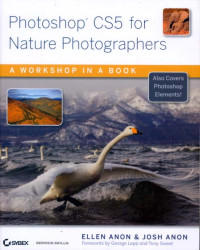
Photoshop CS5 for Nature Photographers: A Workshop in a Book
A Glance at what's in each chapter:
CHAPTER 1 THINKING DIGITALLY discusses the photographic techniques you need to use in camera to get the best results. It covers choosing RAW versus JPEG, understanding exposure, understanding the various types of histograms, setting white balance, and shooting for composites, as well as ethical considerations.
CHAPTER 2 BRIDGE explains how to customize and use Bridge to download, view, compare, sort, and edit your images. You'll learn how to streamline this process and organize your images so you can easily find them.
CHAPTER 3 ADOBE CAMERA RAW covers using the raw converter to make most of the global changes to your images and localized adjustments using the new Adjustment Brush. The adjustments you make here are the backbone of your workflow and will help you create the best possible image.
CHAPTER 4 FOUNDATIONS lays the foundation to make Photoshop or Elements work in a predictable way for you, including color management issues as well as setting the Preferences. It also covers using some of the basic selection and brush tools you'll be employing later as you optimize your images.
CHAPTER 5 WORKFLOWS & FIRST STEPS describes how to create a flexible workflow using Smart Objects & Smart Filters as well as the traditional workflow. It also covers cropping, rotating, and image cleanup and introduces the concept of layers.
CHAPTER 6 EXPOSURE ADJUSTMENTS introduces you to using layer masks and guides you through making various tonal adjustments, including levels, curves, and shadow/highlight.
CHAPTER 7 COLOR ADJUSTMENTS continues the use of adjustment layers to help you fine-tune the color in your image using Hue/Saturation, Selective color, and color balance.
CHAPTER 8 COMPOSITES covers a variety of ways to combine images to create effects not possible in a single image, including creating panoramas, replacing skies, creating extended depth of field, creating extended exposure latitude, and combining parts of various pictures into a single image.
CHAPTER 9 CREATIVE EFFECTS presents ways to become more expressive with your images, including converting to black and white or partially colorized images, adding painterly effects, using various filters, creating digital montages, and even making digital multiple exposures.
CHAPTER 10 OUTPUT covers the workflow after you have created your master file in order to resize, reduce noise, and sharpen your images for print or the Web.
CHAPTER 11 TIME SAVERS presents ways to become more efficient, including actions and batch processing. It also covers ways to create watermarks and copyright brushes.
Ketersediaan
Informasi Detail
- Judul Seri
-
-
- No. Panggil
-
006.6 ANO p
- Penerbit
- Indianapolis : Wiley Publishing, inc., 2010
- Deskripsi Fisik
-
xxi, 473 hal.: ilus.; 25 cm
- Bahasa
-
English
- ISBN/ISSN
-
978-0-470-60734-3
- Klasifikasi
-
006.6
- Tipe Isi
-
-
- Tipe Media
-
-
- Tipe Pembawa
-
-
- Edisi
-
1
- Subjek
- Info Detail Spesifik
-
-
- Pernyataan Tanggungjawab
-
-
Versi lain/terkait
Tidak tersedia versi lain
Lampiran Berkas
Komentar
Anda harus masuk sebelum memberikan komentar
 Karya Umum
  Filsafat
  Agama
Agama  Ilmu-ilmu Sosial
  Bahasa
  Ilmu-ilmu Murni
  Ilmu-ilmu Terapan
  Kesenian, Hiburan, dan Olahraga
  Kesusastraan
  Geografi dan Sejarah